Blogger templates

●๋• Welcome , chào mừng các bạn đến với www.hanoivui.Blogspot.com , website chuyên về crack , serial , patch , code phần mềm từ ít tiền đến nhiều tiền :)) , các bạn có thể liên hệ Y!M mrtrungpower@yahoo.com để đóng góp ý kiến hoặc yêu cầu serial , crack phần mềm . ●๋•
 

Translate (wait 1 minutes will appear)

 
Showing posts with label Software Video. Show all posts
Thursday, July 18, 2013

Splash Pro EX 1.13.2


Giới thiệu máy nghe nhạc Splash PRO EX 1.13.2 Multilingual phương tiện truyền thông thế hệ tiếp theo cho máy tính . Xem phim độ nét cao và máy quay video . Khám phá hình ảnh độ nét cao với công nghệ xử lý kép , hảy thưởng thức chất lượng video cực nét tuyệt vời và cảm nhận sự khác biệt.
Chơi và chuyển đổi tất cả các phim độ nét cao và máy quay video , cực nhanh, mượt và không có vấn đề . Bạn không cần thêm bất kỳ codec . Tải, cài đặt , xem, chuyển đổi và chia sẻ. Nó mất khoảng một giây để bắt đầu ứng dụng và phát lại video độ nét cao !

Setup + Key
 Download here

License For   : KORANSOFTWARE
Serial Number : hFRJE-mjS1l-eeh1O-Rkkjb-mUIjI-mhWvj

DFX Audio Enhancer 11.109


DFX Audio Enhancer nâng cao cảm nhận âm nhạc của bạn nhờ cải tiến chất lượng âm thanh MP3, Windows Media, đài trên Internet và một số file nhạc khác. Với DFX bạn có thể chuyển đổi âm thanh của PC thành một hệ thống âm thanh nổi đắt đỏ thiết kế riêng cho môi trường âm nhạc. Làm mới độ sâu của âm sắc, nâng các mức âm và gảm chiều sâu, phong phú tiếng bass.

Những tính năng của DFX Audio Enhancer:

• Hiệu ứng cao cấp của DFX Audio Enhancement
• Tối ưu hóa loa và tai nghe
• Tinh chỉnh âm thanh định sẵn
• Bộ phân tích băng tần động
• Chế độ xử lý âm thanh mạnh mẽ
• Đặc sắc, kiểu dáng cân đối
• Giao diện ở chế độ mini tiết kiệm diện tích
• Hỗ trợ tái hiện âm thanh 5.1/7.1

DFX cải thiện tức thì cảm nhận nhạc số của bạn với:

• Âm thanh 3 chiều – Hãy để bạn đắm chìm trong làn sóng âm nhạc
• Môi trường âm thanh nổi – Phục hồi trung thực chiều sâu âm thanh đã mất
• Dynamic Gain Boosting – Tăng âm
• Tối ưu hóa tai nghe – Nghe êm dịu hơn (trừ Rock), tự nhiên hơn với headphone
• Tinh chỉnh nhạc – Chọn chế độ tinh chỉnh để có nhiều kiểu nhạc hơn
• Tăng âm trầm (bass) – tạo độ sâu, phong phú tiếng bass
• Phục hồi trung thực – loại bỏ sự tắc âm
• Bộ xử lý dải âm thanh – “Nhìn được” DFX làm nổi bật âm thanh của bạn
• Chế độ âm nhạc và lời nói – hiệu chỉnh tiếng cho các loại âm thanh
• Thay đổi skin – Chọn hàng trăm mẫu skin

Hiệu ứng tiếng động DSP cao cấp:

Phục hồi trung thực giai điệu

• Thực sự loại bỏ tạp âm bằng thuật toán nén dữ liệu sử dụng cho các định dạng âm thanh trên Internet. DFX đền bù cho sự thất thoát âm tần cao bằng khả năng tái tạo cẩn thận những lỗi của giai điệu tần số cao. Chức năng phục hồi hài hòa được thực hiện bằng công nghệ patent-pending cẩn thận kết hợp các giai điệu âm tần cao để thay thế cho những giai điệu đã mất trong quá trình giải mã.
Không khí, nhạc nổi tưởng tượng

• Tạo không khí cho âm nhạc đền bù cho sự mất mát hoặc giảm sút chiều sâu âm thanh, là kết quả của việc để loa quá gần, điều kiện âm thanh nghèo nàn, hay mất âm do quá trình nén dữ liệu các định dạng âm thanh trên Internet. Thay cho sự giảm chiều sâu và âm thanh ảo của PC, DFX đã cẩn thận hồi phục lại không khí và chiều sâu âm nhạc. Kỹ thuật xử lý này đã từng được sử dụng thành công bởi các nghệ sĩ âm nhạc như là Alanis Morissette và Ella Fitzgerald.

Tái hiện âm thanh 3 chiều

• Sử dụng thành phần âm thanh 3D Surround áp dụng chiều sâu ấn tượng và hìh thức vào âm nhạc. Với bộ xử lý 3D Surround, âm thanh như vây quanh bạn, gần như đặt mình vào trong âm nhạc! 3D Surround làm tăng âm sắc chơi ở hệ thống loa đôi thông thường và làm cho cả hệ thống loa PC cỡ nhỏ cũng cho tiếng to hơn và rõ phong phú hơn. Nó cũng đồng thời tương thích với hệ thống Surround Sound playback.
HyperBass

• Sử dụng thành phần HyperBass tạo chiều sâu, độ phong phú âm trầm để thay thế cho những giới hạn về bass của hầu hết hệ thống PC và định dạng nhạc nén. DFX thực hiện bằng cách cẩn thận hồi phục âm tần thấp, như thế làm tăng khả năng cảm nhận bass, nhưng không vượt quá giới hạn vật lý của loa, thêm hoặc thay đổi loa hay máy khuếch đại, và nhất là không tăng lượng tiêu thụ điện. HyperBass cải thiện rõ ràng chất lượng bass của bất kỳ hệ thống âm thanh nào.
Dynamic Gain Boosting

• Thêm vào Dynamic Boost để tăng cảm nhận về độ to của âm thanh trong khi làm co lại cấp độ, đặc biệt là khi sử dụng hệ thống nhạc từ net. Bằng cách thêm vào Dynamic Gain Boosting hệ thống phát lại của bạn sẽ nghe to hơn gấp 2 lần.

• Tiêu biểu là các hệ thống chơi nhạc PC cơ sở và cả hệ thống âm thanh nổi tại nhà trải qua phạm vi và khoảng không giới hạn. Dynamic Boost đền bù cho giới hạn này bằng cách cẩn thận xử lý âm thanh để cảm nhận âm to mà không phải thay đổi phạm vi hoạt động.


Setup:
 Download here
Patch all Version DFX , Patch DFX 11.xxx
Download here
Saturday, July 13, 2013

ProShow Producer 5.0.3310


Hướng dẫn :
Trước khi cài Proshow Producer các bạn nên dùng iobitunistall.exe ,1 phần mềm gỡ bỏ nhanh chóng và triệt để mà dung lượng lại rất nhỏ gọn mà tớ hay dùng ( tầm 800 kb gần 1mb ).

Hướng dẫn sơ qua về phần mềm iobitunistaller :

- có 2 tab trên cùng là unistall ( gỡ từng cái 1 ) và batch unistall ( gở cả 1 nhóm ), tớ thì tớ hay dung tab unistall.
- nhìn vào danh sách phần mềm được cài đặt vào máy tính bạn chọn Proshow Producer 5.0.3310 gở sạch nó ra 


- chờ một lúc nó gở bỏ xong rồi bạn nháy chữ powerfull scan trên phần mềm để nó quét sạch những gì còn sót lại trong registry nhé,chờ nó load 1 tí rồi chọn select all rồi nháy vào chữ delete rồi yes là ok


- sau khi gỡ bỏ xong rồi theo tớ các bạn nên khởi động lại máy tính, rồi dùng cclaner chọn tab registry quét qua 1 lượt nữa cho sạch hẳn registry rác nhé

Sau đó các bạn cài đặt Proshow producer 5.0.3310 như bình thường,sau khi cài đặt xong thoát proshow producer 5.0.3310 rồi copy file patch đã giải nén đến thư mục cài đặt Proshow producer 5.0.3310 rồi nháy vào patch là ok


English :
1- Install ( iobit unistaller ) ->Open iobit unistaller -> unistalll Proshow producer -> powerfull scan - >  select all -> delete -> yes
2- resset computer
3- Open setup proshow producer 5.9.3310 -> Install 
4- Copy file Patch to C:\Program Files\Photodex\ProShow... -> Open patch -> Click patch -> OK
Iobit unistaller
Download here
Setup Proshow 5.0.3310
Download here
Patch Proshow :
Download here


Bản Proshow Producer này không gặp những lỗi khi xuất file như : 

- màn hình Rendering Video của phần mềm có màu đỏ và có dòng chữ ILLEGALLY

- hiện lên bảng thông báo "please wait downloading information" và chờ rất lâu thậm chí chở mãi mà nó vẫn load vẫn là 0% khi xuất video sau khi làm xong


Trong trường hợp này trên diễn đàn có một số cách sửa lỗi đó là : 

- với lỗi thứ 1 thì vào thư mục cài đặt proshow del 2 file proshow.cfg và proshow.phd

- với lỗi thứ 2 thì chỉ có cách ngắt mạng và chờ chờ nữa chớ mãi ...... ----> nản mà nó vẫn load 0% 

Sunday, February 10, 2013

FLV to AVI MPEG WMV 3GP MP4 iPod Convert 6.0.0202

FLV to AVI MPEG WMV 3GP MP4 iPod Converter là một phần mềm chuyển đổi FLV chuyên nghiệp, nó có thể chuyển đổi Video Flash sang các định dạng khác như: FLV sang AVI, FLV sang MPEG, FLV sang WMV, FLV sang MP4
 Ultra MP4 Video Converter 6.0.0202
Video Converter là công cụ mạnh mẽ để chuyển đổi hầu hết các định dạng thông dụng sang chuẩn MPEG-4 như : chuyển đổi AVI sang MP4 , MPEG sang MP4 , WMV sang MP4 ... Phần mềm có thể chuyển đổi nhiều định dạng phổ biến như : DivX, XviD, AVI, WMV, MPG, MPEG, MP4, M4V, FLV, 3GP, ASF, RM, RMVB, MOV, MOD,ASX, MKV, OGM, SVCD, VCD, VOB sang AVI/DivX/MP4/H264 .

Ultra MP4 Video Converter còn tích hợp cả PSP Video Converter và iPod Movie Converter giúp bạn có thể dễ dàng chuyển đổi video để xem trên các thiết bị cầm tay như PSP ,PS3, iPod, Apple TV, Zune, Xbox360, Archos AV500, Archos AV700, Archos Gmini402, iRiver PMP-100, Creative Zen Vision...
Chuyển được cả đuôi FLV nữa nhá :) , mình đang sài cái này
Setup:
Download here
Key:
License Name: H3X4 
License Code: 4C7FA313
Tuesday, January 1, 2013

Xilisoft Video Converter Ultimate 7.6.0.20121114


Xilisoft Video Converter Ultimate is powerful, versatile video conversion software which converts between all popular video formats such as convert AVI to MPEG, WMV to AVI, WMV to MPEG or H.264/AVC video, convert AVI files to iPod formats, etc.

No other programs like Xilisoft Video Converter Ultimate supports so comprehensive video formats including AVI, MPEG, WMV, DivX, MP4, H.264/MPEG-4 AVC, RM, MOV, XviD, 3GP, FLV, VOB (the video format used in DVD), DAT (the video format used in VCD, SVCD), etc. In addition, the video converter provides an easy way to convert video file to popular audio file, like MP2, MP3, WMA, WAV, RA, M4A, AAC, AC3, OGG, etc. The video converter also supports APE, CUE decoding and audio CD ripping. Xilisoft Video Converter Ulltimate supports popular multimedia devices such as PSP, iPod, iPhone, Archos, mobile phone, Zune, etc. All conversions, such as AVI to MPEG, WMV to MPEG, WMV to AVI, MKV to AVI, MKV to MPEG, are very easy and fast with the best quality

Key Features:

• Powerful video effect editing functions to customize your video: crop video size, edit video effects, and add video watermark
• Support the decoding and encoding of lossless audio
• Preview and compare the source video and fixed video
• Merge several video segments to one for conversion
• Clip segments from video and audio, and output them respectively or merge them into one for output.
• Preview clipped video segment.
• More optimized and classified profiles are supported now, and any profile can be customized to create your own one with your favorite settings;
• Customize the output file size and auto-calculate corresponding video bit rate;
• Multiple output formats can be set for one original to facilitate your conversion;
• Convert videos to compatible formats to work on PSP, PS3, iPod, iPhone, Apple TV, Zune, Archos, blackberry, iRiver PMP, Creative Zen, etc.;
• It supports H.264/AVC video format, PSP H.264/MPEG-4 AVC encoding/decoding, PSP H.264/AVC Video (480x272) (*.mp4);
• It provides batch conversion and multithreading, thus you can select multiple files at one time to have them convert one by one automatically;
• You can convert any clip or segment of the video at will by setting the start point and duration, and split one source file to several by duration or file size;
• video codec and audio codec can be modified: alternatively select video codec such as MPEG4, DVvideo, Mjpeg, etc. for AVI, H263, and MPEG4 for 3GP, as well as audio codec like PCM, MP2, MP3, MPEGAAC, AC3, etc.
• When converting files, you can pause, stop and continue at any moment;
• You can keep the default settings or set parameters of the video and audio by yourself to get particular effects for output file.

System Requirements:
Processor: 1GHz Intel/AMD processor or above
RAM: 256MB RAM (512MB or above recommended)
Free Hard Disk: 30MB space for installation
Graphic Card: Super VGA (800×600) resolution, 16-bit graphics card or higher

Compatible with: Windows XP, Vista and Win7 (32/64-bit)
Multilingual: English, Spanish, Deutsch, French, Chinese, Japanese
Setup full
Download here
Saturday, September 1, 2012

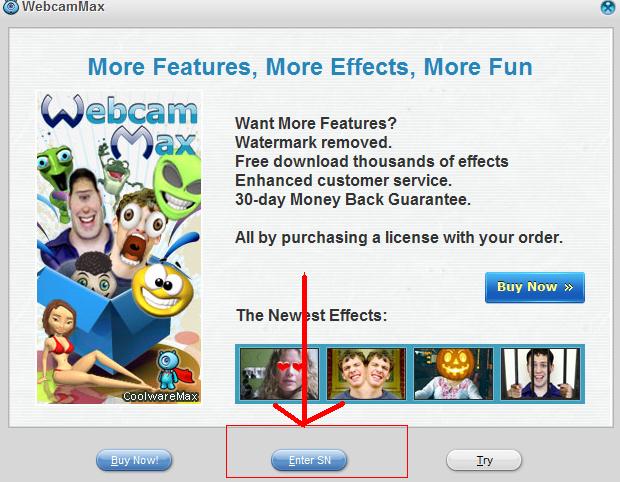
WebcamMax 7.6.7.2


 WebCamMax - is an advanced utility for working with a webcam. The program adds amazing video effects to all webcams, even without a real camera. The program can be used by default in applications such as ICQ, AIM, MSN, Camfrog, Skype, Paltalk, Yahoo, ANYwebcam, Stickam. You can customize WebcamMax Full so, it began to operate and maintain broadcast from the camera only when the lens detects motion.


Available 1000 spetsefektov (manufacturer's website), including television spots, water, mist, smiles, etc., scrolling text over the video, a soft switch between multiple live feeds and stored, using one camera while running multiple programs, treatment own images to bargain appeal or other visual effects. The interface is very easy to change, thanks to the many built-in "skins".

Key features:
- For all webcam programs, such as ICQ, AIM, MSN, Camfrog, Skype, Paltalk, Yahoo Messenger...
- Virtual webcam or enhance real webcam.
- Videos and movies to webcam.
- Desktop screen to webcam.
- Pictures to webcam.
- Floating text over webcam.
- Frame effects over webcam.
- Transform effects over webcam.
- Emotion effects over webcam.
- Webcam effects update weekly online.
- Webcam video recorder.
- Webcam snap.
- Fast switch between virtual and real webcam.
- Share webcam in 16 programs.
- DIY webcam effects.

Setup:
 Download here
Patch+Keygen:
Download here
B1:Chạy Patch webcammax.v7.6.x.x.exe, Run "Patch webcammax.v7.6.x.x.exe"
B2:Hướng dẫn cách điển Key :(how do register webcammax):


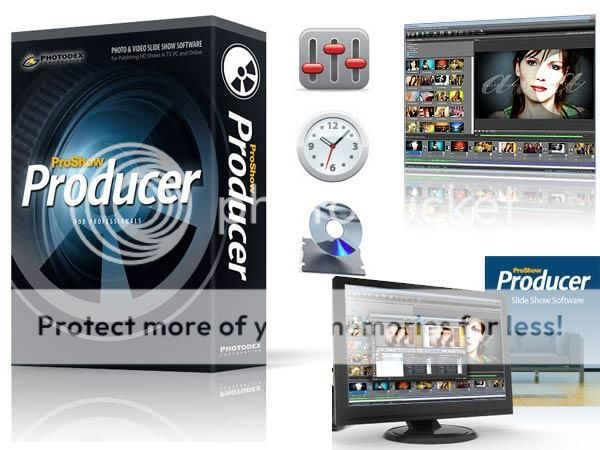
ProShow Producer 5.0.3280


ProShow Producer is the slideshow software designed for stunning professional slideshows creating with unlimited production control, powerful creative tools and time-saving shortcuts. This ultimate tool for creating video slideshows allows to add any amount of photos, videos and music. You can use an impressive arsenal of creative tools and techniques. Automatic show creation and instant aceffects make creation of polished slideshows fast and easy. Only Producer lets you tweak, edit, and customize ’till your heart’s content. Fine-tune, or build something entirely new. Add a professional touch with Hollywood-style movie menus. The software lets share, publish and sell in HD. Online or on your TV. Over 40 ways to publish at your fingertips. Stream on Facebook, YouTube, your blog or website. Burn directly to DVD, Blu-ray and CD. Or go mobile on an iPad or iPhone.
With an award-winning feature set, including unlimited photo/video layering, show templates, branding, copy protection and built-in media authoring, plus all-new creative features like masking, vignetting and motion keyframing, the only limit to your success is your imagination. Photographers can create professional-grade slide show masterpieces that not only look polished, but exhibit advanced, high-end artistic effects previously achievable only through using 3rd party professional photo and video editing software.
ProShow Producer Top Features:
• Easily Add Photos & Videos. Simply drag and drop your photos and videos onto the Slide List to add them to your show. Each slide can have an unlimited number of layers meaning you can create unique photo montages, add borders to images and more. You can even edit your video clips directly in ProShow Producer by using the built-in video trimmer. Use a transition to fade into the next slide for a seamless effect.
* Add an unlimited number of layers to any slide
* Drag and drop to easily add content to a show
* Supports 100+ file types including RAW
* Transparency support for PSD, PNG, TIFF and GIF files
* Built-in video trimmer crops video clips precisely
• Easy-to-use Wizard. Create instant slide shows with Producer’s built-in wizard. Pick a theme, add your content and go! The wizard intelligentally mixes a unqiue slideshow for you in just seconds, no extra work required.
* Add your photos, video and music
* Choose from a wide array of professional themes
* Adjust the energy level of your show
* Customize themes, use just the effects you want
* Experience auto-show creation, no extra work required
• Advanced Creative Effects. Flex your creative muscles with integrated features like Keyframing, Masking and Adjustment Layers. Create unique photo montages and special effects in an instant with Slide Styles. Producer provides you with a palette of creative design tools to create spectacular shows.
* Motion, Effects & Caption Keyframing
* Dedicated Keyframe editor
* Masking capabilities
* Adjustment Layers & Effects
• Use Slide Styles + Transitions for Instant Effects. Producer has over 250 slide styles and over 450 transitions built-in. Use these pre-made effects to add a creative flair to any show. Just click to preview the effect and apply to any slide or transition in your show. You’ll get slick, professional-looking effects in an instant. You can also create, save and re-use your own styles and transitions. Build up a library of effects or share them with other ProShow users.
* One-click special effects
* Over 250 built-in Slide Styles
* Create and save your own Styles
* Over 450 built-in Transitions
* Create and save your own Transitons
• Promote & Protect Your Business. Producer’s branding, watermarking and copy protection features were designed specifically with the professional’s need in mind. Not only are you able to promote your business better but you can rest assured that your slides shows and original content are protected from unauthorized use, allowing you to showcase your work completely on your terms.
* Watermark slides in your show
* Custom Branding options
* Copyprotect discs
* ICC Color profiles for excellent quality output
• HD Quality Output. Whether you’re creating content to playback on TV, PC or the Web, Producer delivers only the best quality output. Provide your clients with true HD quality slide shows that will keep you and your business competitive in an ever-changing market. Don’t waste your pixels on standard definition shows; showcase your images in full HD resolution with Producer’s wide array of high-quality output options.
* Burn to DVD, CD & Blu-ray
* Integrated Facebook, YouTube, Vimeo and Twitter uploading
* Stream shows online with Flash, QuickTime or Presenter
* Output to portable devices like the iPhone, Blackberry & more
Download Setup+Patch (Link MF) ( dạo này lâu lâu mới on :)) lang thang trên mạng thấy có nhiều bài post patch rồi nên thoai hẻm làm nữa T_T lười , post lun lên )
Download here

Friday, August 24, 2012

Video2Webcam 3.3.4.6

  •  Show video clips during video chat easily
    Share your home-made video clips with your friends while chatting online easily.
  • Work even without a real webcam
    Play a variety of videos on messengers no matter whether you have a real webcam or not.
  • Switch between real and virtual webcams quickly
    Click the "Choose Video Source" button to fast switch your webcam video source.
  • Support all kinds of media file formats
    Include video formats (avi, asf, flv, mp4, mpeg, mpg, ram, rm, rmvb, wmv, etc.) and picture formats (jpg, gif, bmp, png, etc.).
  • Work for all webcam programs
    MSN, Yahoo Messenger, Camfrog, Skype, ICQ, AIM, Paltalk, ANYwebcam, Stickam, ICUII, Ustream.tv, iSp

Setup:
Download here
Download Crack+Keygen
Download here

Note: read : "How do register Video2Webcam 3.3.4.6 " 
Guide (Hướng dẫn sử dụng) Mycomputer -> My Network places -> View network connections ->>


Copy : 0927dcea095448978956xzsdascdbab6


Saturday, June 23, 2012

ProShow Producer 5.0.3256 Full Setup


Photodex ProShow Producer 5.0.3256
ProShow Producer allows users to create impressive-looking slideshow presentations that blow Microsoft PowerPoint out of the water. But all this power comes at a price as its many features might easily overwhelm users.
The program's interface is attractive and sleek, but it contains a lot of options and it's not immediately obvious how a user should begin. A visit to the built-in Help file offers guidance and allows users to get started creating slides. The basics are easy, but users will need to take some time to figure out how to best exploit the many features that the program offers. And what a lot of features there are. All the standard slideshow features are here, but ProShow Producer contains many extras, such as the ability to upload your slideshow to YouTube or convert it to Flash. And even the standard features offer almost infinite tweakability, which is both a blessing and a curse; novice users will likely be confused and overwhelmed by all the options. We found the caption editing function--a pretty basic feature for any such program--to be somewhat awkward to use, which is a definite drawback for text-heavy presentations. But overall the software performed well, and the features proved to be as functional as they are numerous.


*Bản Patch đăng kí tên và serial dành cho những ai chưa đăng kí ( chỉ dùng khi bản patch trong bản Setup full k hoạt động )
Download register proshow:
Download here
Setup Full
Download here

Wednesday, June 20, 2012

ProShow Producer 5.0.3256 + Patch


Photodex ProShow Producer 5.0.3256
ProShow Producer allows users to create impressive-looking slideshow presentations that blow Microsoft PowerPoint out of the water. But all this power comes at a price as its many features might easily overwhelm users.
The program's interface is attractive and sleek, but it contains a lot of options and it's not immediately obvious how a user should begin. A visit to the built-in Help file offers guidance and allows users to get started creating slides. The basics are easy, but users will need to take some time to figure out how to best exploit the many features that the program offers. And what a lot of features there are. All the standard slideshow features are here, but ProShow Producer contains many extras, such as the ability to upload your slideshow to YouTube or convert it to Flash. And even the standard features offer almost infinite tweakability, which is both a blessing and a curse; novice users will likely be confused and overwhelmed by all the options. We found the caption editing function--a pretty basic feature for any such program--to be somewhat awkward to use, which is a definite drawback for text-heavy presentations. But overall the software performed well, and the features proved to be as functional as they are numerous.
Setup:
 Download here
Patch
 Download here
Tuesday, February 21, 2012

Photodex ProShow Producer 5.0.3222 + Patch 5.0.3222


Photodex ProShow Producer 5.0.3222
ProShow Producer allows users to create impressive-looking slideshow presentations that blow Microsoft PowerPoint out of the water. But all this power comes at a price as its many features might easily overwhelm users.
The program's interface is attractive and sleek, but it contains a lot of options and it's not immediately obvious how a user should begin. A visit to the built-in Help file offers guidance and allows users to get started creating slides. The basics are easy, but users will need to take some time to figure out how to best exploit the many features that the program offers. And what a lot of features there are. All the standard slideshow features are here, but ProShow Producer contains many extras, such as the ability to upload your slideshow to YouTube or convert it to Flash. And even the standard features offer almost infinite tweakability, which is both a blessing and a curse; novice users will likely be confused and overwhelmed by all the options. We found the caption editing function--a pretty basic feature for any such program--to be somewhat awkward to use, which is a definite drawback for text-heavy presentations. But overall the software performed well, and the features proved to be as functional as they are numerous.
Setup:
Download here
Patch:
Download here

How do crack ProShow Producer :

Friday, February 17, 2012

ProShow Producer 5.0.3222 Full


Photodex ProShow Producer 5.0.3222
ProShow Producer allows users to create impressive-looking slideshow presentations that blow Microsoft PowerPoint out of the water. But all this power comes at a price as its many features might easily overwhelm users.
The program's interface is attractive and sleek, but it contains a lot of options and it's not immediately obvious how a user should begin. A visit to the built-in Help file offers guidance and allows users to get started creating slides. The basics are easy, but users will need to take some time to figure out how to best exploit the many features that the program offers. And what a lot of features there are. All the standard slideshow features are here, but ProShow Producer contains many extras, such as the ability to upload your slideshow to YouTube or convert it to Flash. And even the standard features offer almost infinite tweakability, which is both a blessing and a curse; novice users will likely be confused and overwhelmed by all the options. We found the caption editing function--a pretty basic feature for any such program--to be somewhat awkward to use, which is a definite drawback for text-heavy presentations. But overall the software performed well, and the features proved to be as functional as they are numerous.
Note:
1-Installed Setup Full
2-Open Reg Key ProShow Producer 5.x.exe => Patch
3-OK

*Patch reg key :
Download here
*Setup Full
Download here

Quảng Cáo - Click vào hình dưới đây để rõ hơn

WWW.Hanoivui.tk Của Hàng 10B Chương Dương , Hà Nội - Chuyên bán buôn số lượng lớn , bán lẻ đồ gỗ , phào nẹp , ván sàn tư nhiên Gỗ Hương Gỗ Căm xe Gỗ Pơ mu Gỗ Lim Gỗ Thông cao cấp nhập khẩu từ nước ngoài như Nam Phi , Lào ... , thuốc chống mối mọt , chuột , gián , phun thuốc chống côn trùng nhập khẩu từ cộng hòa liên băng Đức

Updates Via E-Mail